


What is recruiting database? [+ Steps to select the best one]


A recruiting database stores candidate information, resumes, and interaction history in one central system. It helps recruiters manage data, reduce manual work, build stronger talent pools, and prepare large candidate records for ATS import.
If you are facing this problem, a good recruiting database software is the solution you need.
You can choose the best recruiting database based on your objectives, required key features, and available resources.
These software solutions not only manage and organize your data but also support data migration by preparing data sheets and mapping your data fields.
To know more about the use of such recruiting database software, read this blog till the end.
Is there a need to invest in a recruiting database?
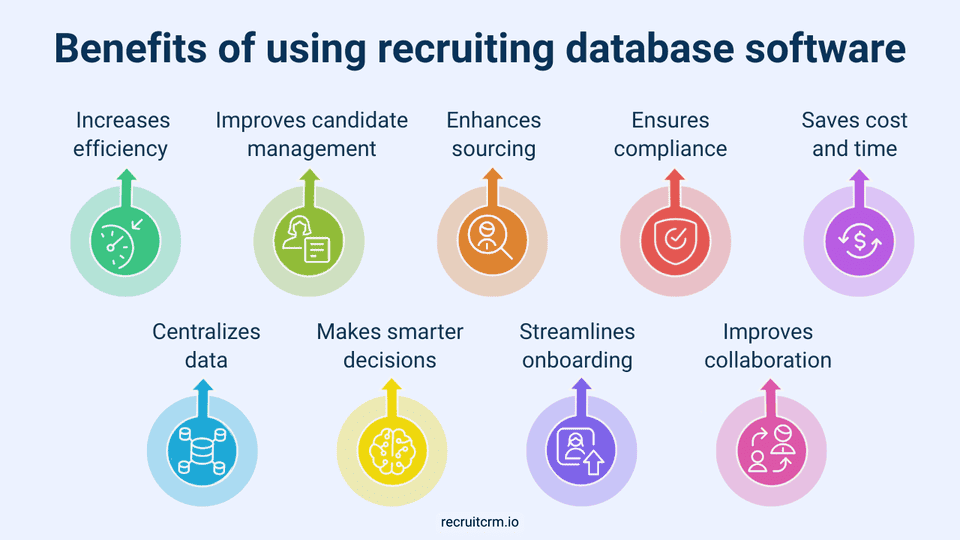
A recruiting database is a centralized system that stores all candidate information, helps you manage resumes, and tracks candidate interactions.Its ability to save you time and effort spent managing candidate data from a single place makes your recruiting process less chaotic and more efficient.
If you are aiming for modern recruitment methods rather than traditional, outdated ones, investing in a recruiting database is a must.
It not only organizes candidate data for you, but also helps you hire quality candidates and keeps you ahead in the competitive market. In the long run, it also helps you build a strong talent pool for further openings.
How to choose the right recruiting database software?
Step 1: Define your recruitment goals and needs
To choose the right recruiting database software, start by assessing the problems your organization is currently facing. It can be anything, ranging from manual candidate screening and slow scheduling to poor candidate communication or low-quality hires.These problems are your key pain points, which will help you identify your objectives and the must-have features for your recruiting database software.
For example, if you are struggling with a high time-per-hire recruiting metric, your objective would be to reduce it. For this, you can use recruiting database software that provides automated features to reduce your manual labour.
Step 2: Look for key features
While looking for a new recruiting database software, it's important to keep your hiring goals in mind.Modern recruitment software offers workflow automation that automates your scheduling tasks, customizes talent pipelines, and provides templates for consistency. Make sure to look for such features, as they help you focus on high-priority tasks by automating repetitive ones.
Ensure the software you choose enables smooth retrieval of candidate data. This feature is often mediated by candidate management tools such as resume parsing, keyword search, and filters.
Apart from these key features, your recruiting database software should also provide candidate communication and analytics tools to support data-driven recruitment.
Step 3: Consider essential variables
While you evaluate the wide range of software available in the market, you should never forget certain essential factors that determine its functionality.You use the following checklist of questions to determine whether a recruiting database software is suitable for your organization:
- Does the software integrate with your existing payroll and HR software?
- Can the software accommodate your needs as the organization grows in the future?
- Is the software intuitive and easy to use?
- Are the software providers offering good support systems and training material?
- What security measures does the software offer for the protection of your candidate data?
Step 4: Evaluate different software
Once you have narrowed down to a few software, it's time to evaluate them. Start by comparing the pricing models of the recruitment database software that you have selected.Always look out for hidden fees (if any) that could negatively impact your budget. Once you are sure that the pricing models are transparent, choose a solution that fits your financial resources while offering the features that you need.
Make sure you read reviews from other users and industry professionals to understand the software's real-time performance. This feedback can highlight its strengths and weaknesses, and help you make an informed decision.
Step 5: Request demo trials
Even after you have made up your mind about a particular software, avoid making a rushed purchase. Always request a demo or trial from the software providers.This allows your team to experience the software firsthand and gives you an idea of whether you need to train your workforce.
The demo also gives you a better understanding of how useful the software is in completing your objectives. If you identify any potential issues or concerns, reach out to the software provider right away.
Many service providers offer free demo trials, while others may charge fees. It’s better to choose a software that gives you access to most of its features during this trial period.
For example, Recruit CRM offers a free trial with access to its core features, including candidate management tools and AI-powered capabilities, so you can explore the platform before choosing a plan.
How to import large volumes of candidate data into an ATS?
Once you have selected the right recruiting database, the next logical step is to import your existing data into the system.Let’s understand some quick steps to import large volumes of candidate data into an ATS:
Step 1: Prepare your candidate data
Begin your data import or migration by cleaning and organizing information such as candidate profiles, resume reviews, job details, background checks, etc.Use tools like Excel or CSV files to store this data in rows and columns. This makes it easy for you to import the data into your ATS software, as many software are compatible with these file formats.
Once you have your sheet ready, look out for duplicate profiles and incorrect candidate details, such as their names, email addresses, job titles, and skills.
Step 2: Map your data fields
Data fields are the specific columns in your database where you store candidate information, such as names and email addresses.To avoid data format differences between your original file and the one in your ATS, you must map these data fields correctly, as any mismatches could lead to incomplete or incorrect data import.
For example, you can ensure that the “First Name” column in your CSV matches the “Name” field in your ATS using the automated field mapping tools of your ATS. This step is especially important when working with large CSV exports from tools like Skrapp, Hunter, or other Hunter alternatives(opens in a new tab), where even small mapping errors can affect thousands of records.
Many ATS platforms use resume parsing features or third-party integrations for mapping your fields, making it easier to align your data before importing.
Step 3: Test the import process
If you’re targeting to import thousands of candidate contacts into your ATS, maintaining caution is a must.Before you run the full import, always test it with a small batch of contacts. This way, you can identify any issues related to your data organization, file format, or ATS as early as possible.
While running this small-scale import, ensure the data flow is smooth and that no data points are harmed. This practice can save you from hours of cleanup after a large import.
Step 4: Complete the import and verify the data
When you get the green signal from the previous step, you can proceed with the full data import. However, your job does not end here.Once you have your desired candidate data in your ATS, verify that all information has been transferred correctly. Look out for minor errors such as missing details or misaligned fields.
If transferring large volumes of data to your ATS is a regular task, it's better to automate the import process. You can do this with API integrations or recruitment automation software that lets you schedule regular imports.
Recruiting database FAQs
1. How to maintain a recruitment database?
You can use the following tips to maintain the recruitment database:- Focus on regular cleanups and remove duplicates, outdated candidate information, and inactive records to maintain accuracy.
- Use tags, filters, and categories to structure candidate information for easy organization.
- Be strict with data access policies and restrict access permissions to authorized team members only.
- Schedule regular backups of your recruitment database to prevent data loss due to unforeseen circumstances.
2. How does a hiring database differ from traditional data storage?
A hiring database is specifically designed to manage and organize recruitment-related data, unlike traditional data storage. It centralizes candidate profiles, resumes, job postings, and interview details into a single system, making it easier to search, filter, and track candidates throughout the hiring process. It also offers features such as resume parsing, workflow automation, and ATS integration.Traditional data storage, on the other hand, lacks these specialized tools. As compared to a hiring database, it may often result in disorganized and inefficient candidate management.
3. Can I import 50,000+ candidates on my ATS?
Yes, you can import 50,000+ candidates into your ATS, but only if your system supports bulk data imports. Many modern ATS platforms, such as Recruit CRM, support bulk data import from CSV or Excel files using various tools. While this makes it easy to manage large datasets, it's vital to ensure your ATS can handle large volumes efficiently and securely.4. Which is the best ATS with unlimited contact storage?
Recruit CRM is one of the best ATS platforms on the market, offering custom contact storage with its enterprise plan(opens in a new tab). While the team plan and business plan offer a limited number of contact storage spaces (10,000 to 20,000 contacts per user), the enterprise plan offers unlimited live trainings and customizable company and candidate limits.5. How to import large-scale candidate data into Recruit CRM?
To import candidate data into Recruit CRM, follow these simple steps:- Step 1: Organize your data in CSV or Excel formats and ensure it's clearly labeled. Use the bulk import tool to upload the files into Recruit CRM.
- Step 2: Map your data fields by matching your file columns (e.g., "Candidate Name," "Email") with the corresponding CRM fields (e.g., "Name," "Email Address").
- Step 3: Once you have mapped your data fields, use Recruit CRM’s bulk import feature to upload your data efficiently.
- Step 4: Automate the data validation. Recruit CRM automatically checks for duplicates, errors, and missing data to keep your database clean.
- Step 5: Preview the data before finalizing the import. Use tools like the resume parser if you find any errors.
Summary
- Recruiters need to invest in a recruiting database, as it helps save time and effort by storing candidate information, managing multiple resumes, and tracking candidate interactions.
- You can select the right recruiting database software by defining your organization’s goals, identifying must-have features, evaluating integrations and functionality through demo trials, and comparing options to choose the best one.
- To import a large volume of candidate data into your ATS, you must prepare the candidate data on Excel sheets or CSV, map the data fields, conduct small-scale imports, and verify the imported data.



Blog written by
Chhavi Chugh
Manager, Content at Recruit CRM
Chhavi Chugh is a content strategist at Recruit CRM with expertise in creating research-backed content for recruiters. She develops practical, actionable insights that help recruitment professionals streamline processes, improve outreach, and grow their businesses. Chhavi's work is designed to address the specific challenges recruiters face in today's hiring landscape.
Stay ahead with the smartest
recruitment newsletter out there!
Join the recruiters who never miss what’s next.






![How recruiters use Recruit CRM for recruitment [11 ways]](/static-assets/_next/image/?url=https%3A%2F%2Frecruitcrm.io%2Fwp-content%2Fuploads%2F2025%2F07%2FThumbnail-_-https___recruitcrm.io_blogs_recruit-crm-for-recruitment-1.png&w=828&q=75)




 marketing@recruitcrm.io
%201.4700f78c.svg&w=32&q=75) Workforce Cloud Tech, Inc. 28 Mohawk Avenue, Norwood, NJ 07648.
Workforce Cloud Tech, Inc. 28 Mohawk Avenue, Norwood, NJ 07648.


