


How can Recruit CRM help in candidate sourcing? [FREE tool]
This is the part of recruiting nobody mentions: the endless copy-pasting.
We recently spoke with a recruiter who spends 60% of their workday doing manual sourcing.
They're copying names, emails, job titles, and contact information from LinkedIn into spreadsheets, one candidate at a time.
That's 16-24 hours every week on data entry when they should be building relationships and closing placements.
Here's the fix: Recruit CRM built an entirely free candidate sourcing tool that finds candidates and provides their verified contact information.
Get to know more about the candidate sourcing capabilities of Recruit CRM.
Highlights
- How to source 30 candidates daily using Recruit CRM's free tool (no credit card needed)
- Why recruiters waste 40-60% of their time on manual sourcing and how to fix it
- When to upgrade from the free tool to the full Recruit CRM platform
- How L-Lindh eliminated duplicate candidate sourcing with intelligent detection of Recruit CRM.
Free candidate sourcing tool by Recruit CRM
Recruit CRM released a completely FREE candidate sourcing tool(opens in a new tab) that automates your entire sourcing workflow.You don't need to be a Recruit CRM customer. You don't need to pay ANYTHING.
Just go to the tool and start finding candidates immediately.
How to use the free candidate sourcing software?
Type simple, conversational searches like "senior developer in Berlin" and hit enter.
The tool scrapes through LinkedIn and gives you 10 candidates per page with their profile information ready to review.
What you get (100% free, forever)
Here's exactly what our free Candidate Sourcing Tool does for you:- 3 searches every single day: Each search gives you 10 candidate profiles, which means 30 candidates daily and over 600 per month.
- Save up to 10 candidate profiles daily: You can save up to 10 candidate profiles per day to review later. Saving a profile means storing its details for easy access.
- Verified contact details: You get 5 email and 5 phone credits per month to unlock candidate details.
- No credit card required. Ever: We don't ask for your credit card or any payment information.
What happens when you outgrow the free candidate sourcing tool of Recruit CRM?
At some point, you'll hit a limit that feels like a good problem to have: you're sourcing so many candidates that 3 searches per day isn't enough anymore.You're making so many placements that 20 contacts per month is holding you back.
That's when you're ready for the full Recruit CRM platform.
Here's what you get with Recruit CRM’s candidate sourcing features:
1. Chrome Sourcing Extension
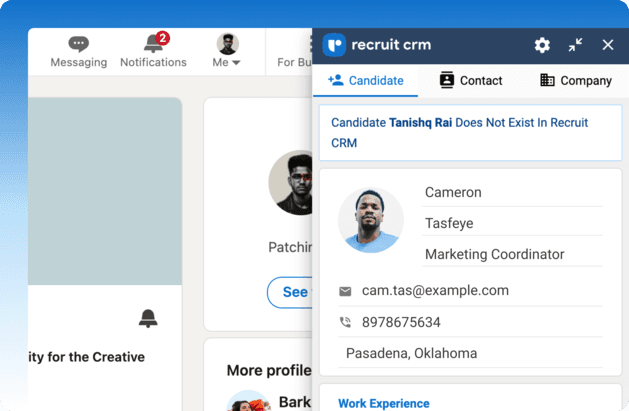
Run the Recruit CRM Chrome sourcing extension on any LinkedIn profile and capture the entire candidate record instantly.
Source from LinkedIn, ZoomInfo, Xing, Indeed, Gmail, Outlook, and more. Everything auto-imports into your database with zero manual data entry.
2. AI Sourcing
Type searches in plain English and get up to 10 enriched candidate profiles per search with verified contact information.You can use voice search hands-free. You can run unlimited searches and auto-import everyone into your CRM.
AI Sourcing gives you unlimited searches (no daily limits), voice search for hands-free sourcing, and auto-import directly into your CRM, where you can track candidates through your entire pipeline.
3. Advanced Boolean Search
Run precision searches on your entire candidate database using Boolean operators and advanced filters.You can search by location radius. Save your searches and reuse them forever.
4. Complete ATS + CRM platform
Get access to a full applicant tracking system and CRM to manage your entire recruitment workflow.You can track candidates through your pipeline, automate email sequences, submit candidates to clients, generate reports, and everything else you need to run a modern recruitment agency.
You're two minutes away from finding your next great candidate.
While you're reading this, other recruiters are already using the free tool to source candidates faster than you.
Frequently asked questions
1. Why is Recruit CRM’s candidate sourcing tool free?
We know candidate sourcing is complicated, time-consuming, and expensive.We built this free tool to make sourcing easier for every recruiter, whether you're using Recruit CRM or not.
Yes, we hope that once you experience how much time automated sourcing saves you, you'll want to explore the full Recruit CRM platform.
But even if you don't, you can still use this tool for free forever.
2. How does Recruit CRM’s candidate sourcing differ from LinkedIn's?
With manual LinkedIn searching, you spend hours scrolling through profiles, copying information, and pasting it into spreadsheets.Recruit CRM automates this entire process.
Our free tool gives you 3 searches per day with 10 candidate profiles per search, already formatted and ready to save.
If you upgrade to the full platform, the Chrome Extension captures entire LinkedIn profiles in one click, and AI Sourcing finds candidates across LinkedIn and the web using plain English searches.
3. Can Recruit CRM help with candidate duplication?
Lauren Lindh from L-Lindh, an executive search firm, had the same problem: duplicate candidates. Her team would source the same person multiple times because they couldn't track whether that person was already in their system.After switching to Recruit CRM's Chrome Extension, the intelligent duplicate detection solved it immediately.
When they source a candidate who already exists, the extension updates their profile rather than creating duplicates.
"The Google Chrome Extension for sourcing was the deal breaker for us to choose Recruit CRM," Lauren says.
4. How can I download Recruit CRM’s Chrome sourcing extension?
Here are the simple steps to download Recruit CRM’s Chrome extension for sourcing:- Step 1: Download the Chrome Extension from the Google Webstore. Pin the Chrome Extension on your browser to start using it.
- Step 2: Once you see the extension at the top right corner of your screen, you can start the sourcing process by just clicking on the ‘R’ button icon once you’re on any profile page.
- Step 3: You can do follow-up actions on the records, like adding notes, tasks, jobs, hotlist, etc. Once you click on ‘Done,’ the record will be added to your Recruit CRM database.
- Step 4: Recruiters can add notes, tasks, jobs, and more with this Chrome extension, and once you click “Done”, the data is transferred to your Recruit CRM database.
Blog summary
- Recruit CRM offers a free candidate sourcing tool that eliminates manual copying on LinkedIn.
- Get 3 free searches daily (10 candidates per search), save 10 profiles daily, and unlock 20 verified contact details monthly.
- The tool automates your entire sourcing workflow with simple searches like "senior developer in Berlin."
- When you outgrow the free tool, upgrade to the Chrome Extension (one-click sourcing from LinkedIn, ZoomInfo, Xing), AI Sourcing (unlimited plain English searches), Advanced Boolean Search (precision filtering), or the complete ATS+CRM platform.
- The blog covers the installation steps for Chrome extensions, duplicate prevention features, and answers common questions about how Recruit CRM's candidate sourcing differs from manual LinkedIn searching.


Get 20% commission on cash collected per month from every customer you refer for upto one year.
Join Recruit CRM’s affiliate program and start making money.
Categories
Stay ahead with the smartest
recruitment newsletter out there!
Join 30K+ recruiters reading the best newsletter in recruitment.