


AI in recruitment: What recruiters need to know in 2026


AI in recruitment means using tools to handle sourcing, screening, scheduling, and outreach so recruiters keep the judgment calls. It reduces time-to-fill and admin hours, but screening bias and candidate data privacy remain real problems worth checking before you buy.
The goal isn't to hand over your entire process to AI. You still decide which candidate is right for a role, how to approach a client conversation, and when a search needs a different strategy. But when AI takes care of the repetitive work around those decisions, you get more time back for the conversations, relationships, and judgment calls that actually move placements forward.
In this guide, you'll see what AI in recruitment does well, where it still needs your oversight, and how you can bring it into your workflow without disrupting what already works.
What AI in recruitment actually means
Every recruitment tool now says it has AI. But there are two kinds of AI, and they do very different things.Basic AI helps with one task. You ask it something, it answers, and it stops. Agentic AI runs a whole chunk of work start to finish, then hands you the results to check.
Here's how the two kinds of AI compare side by side:
Basic AI | Agentic AI | |
| What it does | One task at a time | A full sequence of tasks |
| How it starts | You click something | You set the goal once |
| Example | Pulls skills and dates off a CV | Searches your database, shortlists the top matches, and writes the first message |
| Who does the work | You, at every step | You, only at the end |
| What you get back | A faster version of the same task | A shortlist ready to review |
| What it can't do | Decide anything | Decide anything |
Where AI really makes a difference
If you're wondering whether other agencies are actually doing this or just talking about it, recruiting is where AI has landed first.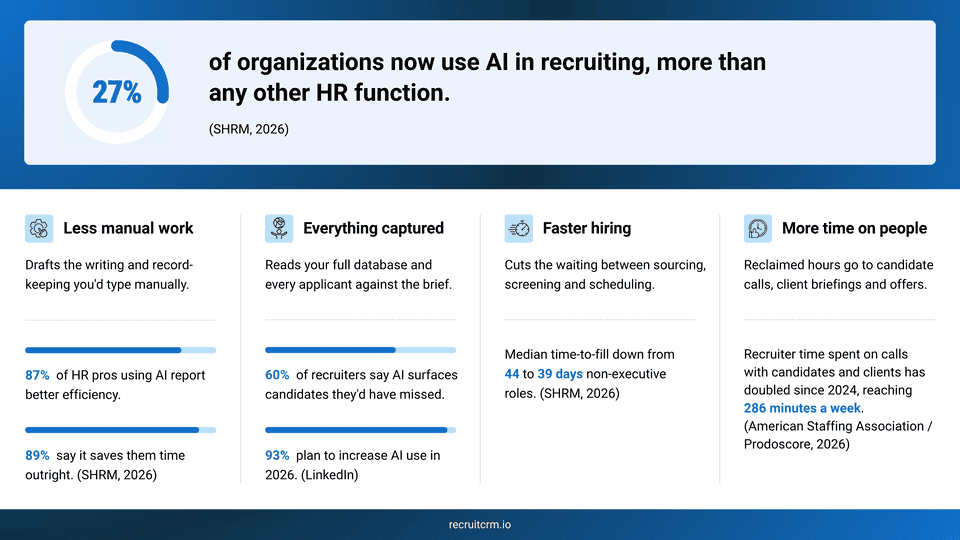
1. Less manual work
Writing job descriptions, formatting CVs, logging call notes, chasing a candidate who went quiet — None of these tasks need your judgment, and they eat your entire afternoon.It doesn't stop there. You're also writing a stream of emails, summarizing call transcripts, typing up interview notes, and pulling together feedback for hiring managers every week, all of which can be handled by AI.
AI listens to your call and writes the summary. It turns a rough brief from a client into a proper job description. It drafts your follow-up email before you've opened your inbox. You read it, fix what needs fixing, and send it.
Research on AI note-taking tools found that summarizing intake calls and interview debriefs this way cuts the time spent on that admin by around 70%(opens in a new tab).
2. Everything captured
You don’t need to look for a new candidate every time a new role opens up. Your database is full of strong candidates you have already spoken to and who have shown interest in similar roles.AI reads all of them against a new brief, including the ones you'd never think to search for. LinkedIn's own data backs this up: 60% of recruiters say AI is surfacing "hidden gem" candidates(opens in a new tab) they'd have overlooked in a manual search.
Recruit CRM's AI candidate matching works this way against your own database. Pick a candidate who's already a strong fit for a role, and it finds others with a similar profile, skills, experience, education, scored out of 100, so the closest matches surface first instead of whoever applied most recently.
3. Faster hiring
2026 recruiting benchmarking data(opens in a new tab) show that the median time-to-fill for nonexecutive roles fell from 44 days in 2025 to 39 days in 2026, and teams using AI well are consistently the ones landing at that faster end.For an agency, speed decides who gets paid. Most contingency roles go to two or three firms at once, and only the firm whose candidate is hired sees any money. So the days you save are about reaching the client before the other firms do.
And it's not just one search where this matters. It happens every time you compete for a role. If you win the timing often enough, you close more of the roles you're chasing. SOAL Technologies(opens in a new tab) found that agencies using AI for screening cut that step by up to 75%, and that's usually the difference between reaching the client first or last.
4. More time on people
The time saved by AI doesn't vanish. Instead, it goes into the part of the job that actually secures placements: talking to candidates, properly briefing the client, and negotiating the offer. (opens in a new tab)This is also the part of the job that pays you twice. A candidate who feels looked after during the process comes back to you next time they're looking, or sends someone else your way. That's the real return on this kind of time.
LinkedIn's talent research(opens in a new tab) describes exactly this shift, with recruiters moving away from time-consuming workloads and toward relationship-building, candidate experience, and advising hiring managers. Same hours, better work in them.
Where AI needs watching
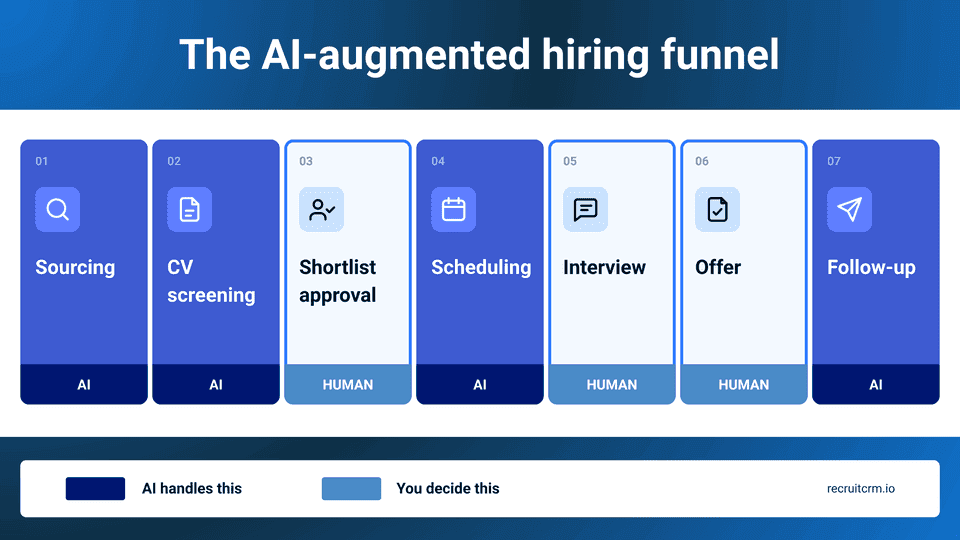
The benefits of AI are real, and so are the problems. You just won't hear about them easily, so below are the three that matter most.
1. Bias and fairness
AI screening carries the hiring bias in its training data. Stanford researchers(opens in a new tab) analyzed 4 million applications processed by a live AI screening tool and found that candidates from certain groups were given higher priority than others, even though race was never entered anywhere in the application. The tool worked it out from other signals.The usual answer to this is that a human reviews everything anyway. University of Washington researchers(opens in a new tab) tested that assumption with 528 people screening candidates alongside a biased AI. They copied its preferences.
Here’s the part that's easy to miss. The AI doesn't tell you who to reject. It just puts candidates in an order, and you end up trusting that order more than you'd trust your own gut on any single name. That's how a biased list turns into a biased shortlist, without you ever making an obviously unfair call on one candidate.
Without AI suggestions, you'd expect people to pick evenly. With AI, reviewers followed whichever group the model favored. Human review only helps when the bias is obvious enough to spot.
So what actually helps:
- Check your pass-through rates by group every quarter, not just once at setup
- Ask your provider for their most recent bias audit, and ask when it was run
- Look at your rejections, not your shortlists, because that's where the pattern hides
- Overrule the tool sometimes, and keep a record of when you did
2. Data privacy
The CVs in your system belong to people who trusted you with them, and usually to a client as well. Put them into a new tool and someone else is now holding them. That's a real obligation.Four questions to ask before you sign anything:
- Where is the data physically stored, and in which country?
- Does it train the provider's models, and can you switch that off?
- How long is it kept, and what happens on the day you cancel?
- Who on the provider's side can see your candidate records?
3. Over-reliance risk
Push AI too far into the process, and candidates walk. Greenhouse(opens in a new tab) surveyed 2,950 job seekers in 2026 and found 38% had abandoned a hiring process because it involved an AI interview. Another 12% said they would.Candidates accept AI doing the sorting. But they also notice the moment it replaces the conversation. Roughly where the line sits:
- Fine: parsing CVs, matching against a brief, scheduling, and reminders
- Risky: automated rejections with no human eyes on them
- Avoid: AI running the actual interview
- Never: let the tool make the final call on anyone
Your first 4 steps with AI: where to start
Most agencies get this wrong in the same way. They buy the platform with the longest feature list, switch everything on at once, and three weeks later, the team is back to doing things the old way, with an expensive subscription running in the background.Start with one task instead. Pick something small, set it up properly, and give it a month before you add anything else.
The best starting point is usually a workflow your team already does often enough to judge properly. Look for something repetitive, easy to measure, and low-risk if the AI gets it wrong. That gives you a clear baseline, enough real-world usage to spot problems, and a much better sense of whether the tool is actually saving time or just adding another step.
Four things determine whether it works: choosing the right task, verifying that the feature does what it claims, ensuring your candidate data is safe, and tracking whether your numbers actually moved.
1. Spot the tasks worth automating
Pick a week and write down what you actually did with your time. Then look at each task and ask two questions:- Does a mistake here cost you the placement, or just a few minutes to fix?
- Does this task need your judgment, or just your time?
Parsing a spreadsheet of applicants into your system fits this. So does drafting the first outreach message, since you'll read it before it sends. Narrowing hundreds of applicants down to a shortlist fits too, and AI is genuinely good at this part.
A useful test is to look at the gap between effort and consequence. Some tasks take up a lot of time but have a low cost if they need correcting. Others take only a few minutes but carry the weight of the entire placement. The first category is where AI usually creates the quickest wins.
Picking the final three who actually go to the client is different. That decision needs your judgment, since a mistake there costs you the placement directly.
Start where the downside is small, and you can check the work. That's the whole logic of recruitment automation: start small and verify.
2. Know what to look for in an AI feature
The AI recruiting software demo will look good. It's built to. What you want to know is how it behaves on your worst day, with your messiest data.- Ask to run it on your own database, not their sample one
- Check whether you can see and edit what it produced before anything goes out
- Find out what happens when it gets something wrong, and how you undo it
- Make sure it works inside your existing system rather than beside it
3. Check the security before you commit
The data privacy section covered what happens to your candidate data. This is about who can reach it.- Ask for a SOC 2 report or ISO 27001 certificate, and check the date on it
- Confirm you can set permissions by user, so a new consultant can't export everything
- Look for an audit log showing who viewed or changed what
- Ask directly whether they've had a breach, and what they did about it
4. Measure the actual output
Write down your current numbers before you switch anything on. Time to shortlist, candidates contacted per role, and placements per consultant are the recruitment metrics to baseline. Without that baseline, you have nothing to compare against.Then check at 30 days and again at 90. If the numbers haven't moved, the problem is usually the setup rather than the tool itself. Ask your provider to look at it with you before you write the whole thing off.
5 best AI recruiting tools right now
Four of these five are built for in-house teams hiring for one company. Only one is built for agency work.| Tool | Best for | Standout AI feature | One thing to know |
| Recruit CRM | Recruitment agencies | AI agents across sourcing, submissions and outreach, with recruiter review built in | Built around recruitment firms and agency workflows |
| Eightfold AI | Large in-house talent teams | Skills inference across an existing talent pool | Designed for enterprise-scale databases |
| Paradox | High-volume frontline hiring | Conversational assistant for applications and scheduling | Part of Workday, so it pairs naturally with a Workday stack |
| HireVue | Structured interviews at scale | Voice-based AI interviewer backed by its own validation studies | Strongest where applicant volume needs consistent scoring |
| SmartRecruiters | Enterprise ATS buyers | Automation across high-volume hiring workflows | Part of SAP, so it fits best alongside SuccessFactors |
1. Recruit CRM: AI-first ATS + CRM for recruitment firms
Recruit CRM combines an ATS and a CRM in one platform, built specifically for recruitment agencies rather than in-house teams. It covers CV formatting, candidate submissions, pitching and email replies, and every AI output comes back to you for review before it reaches a client.Its model context protocol (MCP) takes this further, letting your ATS talk directly to AI tools like Claude and ChatGPT, so you can pull live pipeline data into a conversation instead of switching between apps.
AI sourcing and AI candidate matching now run as one workflow instead of two separate steps. Describe the candidate in plain English, or start from a job description, and AI builds the search filters and matching criteria for you. Every match comes back with a score out of 100 and a reason why, run against 800 million+ public profiles or your own database.
AI Assist (GPT integration) helps recruiters handle the writing and summarization work around every search. Create job descriptions, generate candidate summaries, and draft emails faster with AI-powered content creation built into your workflow.
Want to learn more about Recruit CRM? Start a free trial or book a demo with us for a personalized walkthrough on how AI works in your workflows.
2. Eightfold AI(opens in a new tab): Skills-based talent intelligence
Eightfold was founded by former Google AI engineers(opens in a new tab), and Eightfold says(opens in a new tab) its matching model is trained on more than 1.6 billion career profiles. That's what lets it match people to roles by inferring adjacent skills instead of matching keywords, so candidates surface for jobs they never applied to.It also surfaces internal candidates and past applicants who already sit in your database. One reviewer who implemented Eightfold at a mid-size tech company(opens in a new tab) reported filling nearly a quarter of open roles in a single quarter from previously sourced candidates, at no extra sourcing cost.
Candidate details can be hidden during review, with names, photos, and other identifying details stripped out, so the focus stays on skills rather than who the person is.
The matching needs a large talent pool to demonstrate its value, and the pricing reflects that as well. If you're running fewer than a few hundred open roles a year, you likely won't see enough return to justify it, making it a better fit for enterprises than for smaller agencies.
3. Paradox(opens in a new tab): Conversational AI for high-volume hiring
Paradox runs the top of your funnel through chat, answering applicant questions and checking basic requirements without you touching a keyboard. Its chatbot Olivia also books interviews directly, which removes most of the scheduling back-and-forth.It also handles the follow-up questions candidates usually save for a phone call, like pay range, shift options, or where the job is actually located, so fewer of those end up sitting in your inbox. Olivia runs in more than 100 languages, which matters if you're hiring across regions.
Workday completed its acquisition of Paradox(opens in a new tab) in October 2025 and now sells it inside its talent acquisition suite.
It's strongest for hourly and frontline roles and does less for a specialist search with a dozen candidates.
4. HireVue(opens in a new tab): Structured interviews and assessments
HireVue focuses on structured interviews and skills assessments. In June 2026, HireVue launched a voice-based AI Interviewer(opens in a new tab), which it says scores every interview using rubrics built from more than 70 million real interview interactions.Along the way, HireVue also refined its approach by dropping features that didn't hold up under scrutiny, such as facial-expression scoring, and kept its focus on what a candidate actually says. That's the part backed by real research.
AI interviews are also the stage candidates are most likely to abandon, so it pays to use them where volume genuinely demands it.
5. SmartRecruiters(opens in a new tab): ATS for enterprise teams
SmartRecruiters is an enterprise ATS covering the hiring process from sourcing through onboarding.Its AI features include screening and shortlisting, and SmartRecruiters reports(opens in a new tab) faster candidate progression and reduced time spent in the hiring stage as a result. It has also been expanding into areas such as agentic interviewing and applicant fraud detection.
SAP completed its acquisition of SmartRecruiters in 2025, and the platform is being integrated with SuccessFactors. For organizations already using SAP's ecosystem, that broader integration is a key consideration.
For a wider list, see our roundup of the best AI recruiting tools.
Where AI recruiting is headed next
1. You're about to get a lot more applications
Here's something most recruiters haven't clocked yet: candidates can now pay about $20(opens in a new tab) for a tool that auto-applies to hundreds of jobs on their behalf. It sounds small, but the effect isn't.The bigger change is that the old signals recruiters relied on are getting weaker. A candidate applying used to show some level of intent. Now, an application can be sent automatically with little effort, which means volume alone tells you much less about who is genuinely interested.
Applications per recruiter are up 411%(opens in a new tab) since 2022, while recruiting teams themselves have shrunk by more than half over the same stretch. Some job postings now pull in 250+ applicants within days.
For you, this changes what screening actually means. It's no longer just sorting good candidates from weak ones; it's telling a candidate who genuinely wants your client's role apart from someone whose AI tool blasted it out along with 400 others.
2. A few big companies are buying up all the AI tools
A few years ago, you had dozens of small, focused AI recruiting tools to pick from. That's changing fast. Workday alone has bought six AI companies(opens in a new tab) in under two years, including HiredScore, Evisort, and Paradox. SAP bought SmartRecruiters. Most standalone tools out there are being bought by one of a few large platforms.What this means for you practically is that the tool you sign up for today might be run by a completely different team by the time your contract's up for renewal. Before you commit to more than a year, ask who actually owns the product and what their plans are for it.
3. Telling candidates you're using AI is becoming the law, not just good practice
Illinois' HB 3773(opens in a new tab) took effect on 1 January 2026, and it's a good preview of where this is going. It requires employers to notify candidates when AI is involved in hiring decisions, bans the use of zip codes as stand-ins for protected characteristics, and carries real civil penalties for getting it wrong. (opens in a new tab)Texas passed its own AI law(opens in a new tab) the same day; though it's narrower, it bans intentionally discriminatory AI but doesn't require the same candidate disclosure Illinois does. New York City has required annual, independently audited bias checks(opens in a new tab) on hiring tools since 2023.
For recruitment agencies, this means AI usage will become another question clients ask before trusting you with their searches. Being able to explain where AI is used, what it does, and where a recruiter steps in will become part of showing that your process is reliable.
4. Candidates still don't trust the process
Here's the uncomfortable part. The same Greenhouse study(opens in a new tab) behind the abandonment numbers earlier in this piece also found that only one in five candidates believe employers are using AI responsibly. That gap between how much recruiters lean on AI and how little candidates trust it isn't closing on its own.For you, this is less a compliance issue and more a candidate-experience one. Being upfront about where AI touches your process, and where it doesn't, is quickly becoming the difference between a candidate who sticks with you through a long search and one who ghosts you the moment something feels automated.
Frequently asked questions
1. Will AI replace recruiters?
No, AI will not replace recruiters. AI replaces tasks, not roles. The work it takes over is the work no client ever paid you for anyway, like formatting a CV or chasing a status update. What clients do pay for is judgment, persuasion, and relationships, and none of that is close to being automated.2. How much does AI recruiting software cost?
AI recruiting software is usually priced per user per month, with AI features either included in the plan or charged separately as credits. Costs scale with the size of your team rather than the number of candidates you handle, so a five-person agency pays far less than a fifty-person one. Always check whether AI is bundled or billed on top, because that's where quoted prices and actual invoices tend to differ. If you want a real reference point, Recruit CRM's pricing page breaks down exactly what's included at each tier, so you can see how that split actually works.3. Does AI make the final hiring decision?
AI should not make the final hiring decision, and the law increasingly expects a human to. Under the Illinois rules now in force, an employer stays liable for a discriminatory outcome even when a third-party tool produced it. Use AI to narrow and rank your candidates, then make the call yourself and be ready to explain how you got there.4. Which is the best AI tool for recruitment?
The best AI tool for recruitment depends on what you're hiring for. Agencies working with multiple clients need an ATS and CRM built around placements, which is where Recruit CRM comes in. In-house teams filling hundreds of frontline roles get more from high-volume tools like Paradox. Compare options against your own workflow rather than a feature list.Blog summary
- Two kinds of AI exist. Basic AI does one task. Agentic AI runs a whole sequence and hands you the results. Neither one makes a decision.
- AI helps with four things. Less repetitive work, better use of your database, faster time-to-fill, and more hours for the conversations that win placements.
- AI also gets things wrong. Screening tools carry real bias; a human reviewing the output doesn't fix that; your candidate data ends up with someone else, and candidates walk when AI replaces the conversation.
- Every platform has AI now. What separates them is accuracy on your data, whether you can override it, and whether your team still uses it after three months.
- Recruit CRM is an AI-first ATS and CRM built for agencies, and every AI output comes back to you before it reaches a client.
- Eightfold AI infers adjacent skills across very large talent pools, so it suits enterprise teams more than smaller agencies.
- Paradox handles high-volume frontline hiring through chat and is now owned by Workday.
- HireVue does structured interviews and assessments at scale, backed by more published validation research than most tools in its category.
- SmartRecruiters is an established enterprise ATS with strong automation, now part of SAP.



Blog written by
Kaushal Chandratre
Content writer at Recruit CRM
Kaushal Chandratre is a content writer at Recruit CRM, where he writes content designed to make recruiters’ lives easier. He focuses on simplifying complex hiring processes and sharing practical strategies that recruiters can apply in their day-to-day work.
Stay ahead with the smartest
recruitment newsletter out there!
Join the recruiters who never miss what’s next.






 marketing@recruitcrm.io
%201.4700f78c.svg&w=32&q=75) Workforce Cloud Tech, Inc. 28 Mohawk Avenue, Norwood, NJ 07648.
Workforce Cloud Tech, Inc. 28 Mohawk Avenue, Norwood, NJ 07648.


