


How to automate your candidate data management smartly


Candidate data management tools like ATS, CRM systems, automation tools, data analytics tools, and candidate assessment tools help recruiters organize and manage candidate information. These tools reduce manual tracking and support faster, data-driven hiring decisions.
Candidate data management helps you organize, track, and use candidate information smartly across your hiring process. In this guide, you’ll discover the tools that make it easier—and how to move from manual tracking to automation without the chaos.
What is candidate data management?
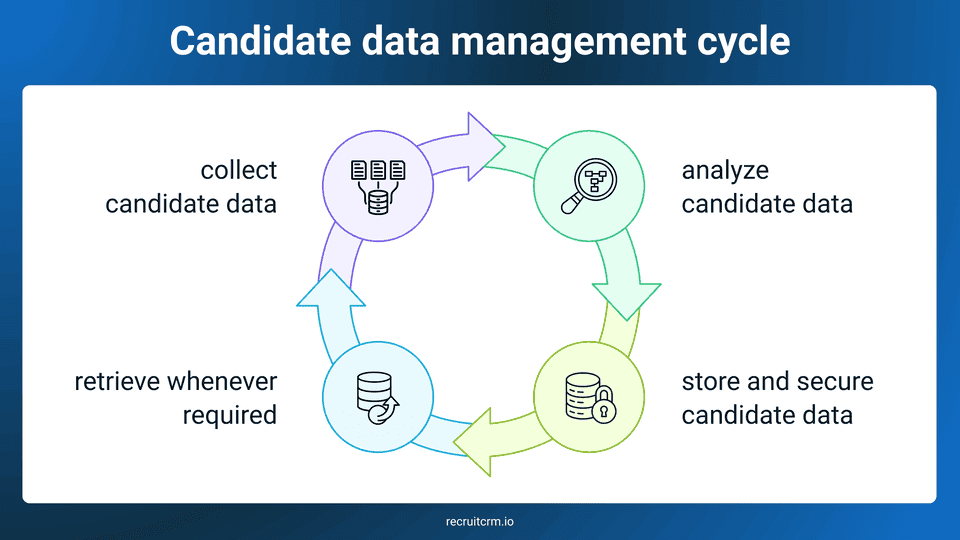
Candidate data management is the process of making your candidate data more accessible and well-organized by collecting and storing candidate information throughout the recruitment lifecycle.If your organization handles high-volume recruiting, it's essential to have an effective candidate data management system to prevent the loss of valuable candidate information.
Apart from data security, good candidate data management can help you make data-driven decisions, shorten your hiring process, and enhance your candidate experience by ensuring transparency and personalized communication.
What are the must-have tools for effective candidate data management?
1. Applicant tracking system
In modern recruitment, a sound applicant tracking system (ATS) is one of the most essential tools for managing candidate data effectively, as it helps you track and manage candidates in every stage of your recruitment process.The basic functions of an ATS that help you manage candidate data are:
- Tracking applications
- Centralizing candidate data
- Parsing resumes
- Automating candidate communication
- Analysing recruitment metrics
2. Customer relationship management system
A Customer Relationship Management (CRM) system is used in modern recruitment to build and maintain long-term relationships, especially with passive candidates.CRM software helps you store candidate profile details, including candidate interactions and interview feedback.
Using a good CRM, you can engage with candidates, track their progress, and nurture them for future roles.
Many platforms, like Recruit CRM, offer ATS + CRM software, giving you access to two essential tools of candidate data management.
3. Automation tools
Automation tools in candidate data management are those software that take over your repetitive recruitment tasks, such as resume parsing and interview scheduling.Most of the automation tools offer powerful features, such as CV parsing, candidate outreach, interview scheduling, and follow-ups.
You can utilize these automation tools to reduce manual labour and speed up your hiring process, an approach increasingly supported by solutions built by leading app development companies(opens in a new tab). With the system handling your time-consuming tasks, you can shift your focus to strategic work, such as building relationships with top candidates.
As an all-in-one software solution, Recruit CRM provides a wide range of automation features that help you ensure that none of your candidates remain overlooked.
4. Data analytics tool
Data analytics tools help you track and evaluate your recruitment performance by collecting and analyzing key recruitment metrics from your hiring process.Tracking recruitment KPIs like time-to-hire, candidate source, and conversion rates can help you identify recruitment trends and inefficiencies in your hiring cycle.
This helps you generate data analytics reports using recruitment dashboards and predictive analytics. Based on these reports, you can strategize your recruitment process effectively.
Data analytics tools are important in candidate data management as they manage and optimize large volumes of recruitment data for you. Candidate data analysis makes it easy to organize candidate information and also helps you make better hiring decisions.
5. Candidate assessment tools
Candidate assessment tools evaluate aspects of a candidate beyond their resume to determine whether they are a good fit for the role and your company.These evaluations are carried out using features such as skills assessments, personality tests, and structured interviews. This provides you with a clear picture of their strengths, weaknesses, and cultural fitness.
You can integrate tools into your existing HR system to collect and organize candidate assessment results. By storing all evaluation data in these tools, you can easily compare candidates and make data-driven decisions.
How to shift from manual candidate data management to automated systems?
Shifting from manual candidate data management to automated systems is not easy. Follow these key steps to make your transition smoother and more effective.Step 1: Identify your pain points
It's always better to begin your transition journey by identifying the pain points, such as management errors, scattered communication data, hiring delays, etc of your current manual process.Generating a list of issues you want to tackle can help you clarify your wants and needs. This understanding will further help you select the right tool to address these issues.
If candidate data is being accessed across multiple employee devices, security should also be part of that evaluation, as endpoint security solutions like EDR(opens in a new tab) can help detect and respond to threats that could put sensitive applicant information at risk.
For example, if losing track of recruitment communications is your main problem in manual candidate data management, your solution might be a CRM system that stores all candidate interactions in one place.
Step 2: Select the right candidate data management software
Once you've identified your pain points, the next step is selecting the right candidate data management software.The most common tools include Applicant Tracking Systems (ATS) and Customer Relationship Management (CRM) platforms, which help automate basic recruitment tasks such as sorting resumes, sending emails, and tracking candidate status.
Go for a candidate data management software that centralizes candidate information, automates repetitive tasks, and provides real-time updates. Make sure that the tool you select aligns with the pain points you identified in step 1.
If you have an extensive list of issues that need to be tackled, look for an all-in-one automated solution like Recruit CRM, which can help you manage candidate data from one place.
Step 3: Migrate your data
Migrating your existing candidate data into the new automated system is a daunting task that requires proper planning.Never start your data migration process abruptly. It's essential to review and clean your data by removing duplicate and outdated information, so that only relevant, accurate data is transferred to the new system.
Make sure to set up your new candidate data management system before you start with data migration. This helps you to avoid interruptions and loss of valuable candidate data.
Running a full backup of your existing data before migration begins is worth building into the same checklist, since enterprise backup software(opens in a new tab) can restore records quickly if anything is lost or corrupted mid-transfer.
Most systems, including Recruit CRM, provide data migration support tools that make the entire process seamless.
Step 4: Train your team members
Training your team members is essential, as they should know how to use the new automated system effectively.If proper training isn’t provided, your team may struggle to use the new system effectively. Your team members may misuse automation features, leading to disorganized candidate data and hiring delays.
Select tools that provide hands-on training sessions, demos, or free trials, where your team members can learn the features of your new software.
Once your team is familiar with the system, they’ll be able to use it confidently. This leads to faster and more accurate hiring decisions, making your candidate data management easier and more fruitful.
Candidate data management FAQs
1. Why is candidate data management important?
Candidate data management is important because it makes it easy to track, organize, and access candidate information. It reduces the risk of losing valuable candidate data, minimizes recruitment errors, and makes the process smoother. Well-organized candidate data improves your decision-making and candidate experience, ultimately leading to faster hires.2. What is CV parsing?
CV parsing is the automated extraction of key information from candidates' resumes, such as contact details, skills, experience, and qualifications. It helps save time by reducing manual data entry and increasing your accuracy. It allows you to evaluate candidates faster by organizing resumes for easier scanning.3. Can Excel or Google Sheets work for candidate data management?
Excel and Google Sheets can be useful for basic candidate tracking, but they do not provide advanced features commonly used in modern recruiting. They require manual updates and lack integrations with other systems, which makes them inefficient for complex hiring processes. As they lack features such as automatic resume parsing, candidate scoring, and real-time collaboration among team members, they are not well-suited for candidate data management in organizations with high hiring volumes.4. How do I ensure privacy and compliance in candidate databases?
You can ensure privacy and compliance in your candidate databases by following these steps:- Use secure, encrypted systems to store and transfer candidate data.
- Restrict candidate data access to authorized personnel only.
- Be aware of your regional data protection laws (such as GDPR and CCPA) and ensure you follow them.
- Obtain clear consent from candidates before collecting, storing, and using their data.
- Conduct regular audits to ensure your data security practices are up to date.
- Securely dispose of outdated or irrelevant candidate data by properly deleting it.
Blog summary
- Candidate data management is the process of collecting, analyzing, securely storing, and organizing candidate data for easy retrieval.
- ATS, CRM, automation tools, data analytics tools, and candidate assessment tools are essential for effective candidate data management.
- You can shift from manual candidate data management to automated systems by identifying your pain points and selecting an appropriate tool accordingly.



Blog written by
Chhavi Chugh
Manager, Content at Recruit CRM
Chhavi Chugh is a content strategist at Recruit CRM with expertise in creating research-backed content for recruiters. She develops practical, actionable insights that help recruitment professionals streamline processes, improve outreach, and grow their businesses. Chhavi's work is designed to address the specific challenges recruiters face in today's hiring landscape.
Stay ahead with the smartest
recruitment newsletter out there!
Join the recruiters who never miss what’s next.






![How recruiters use Recruit CRM for recruitment [11 ways]](/static-assets/_next/image/?url=https%3A%2F%2Frecruitcrm.io%2Fwp-content%2Fuploads%2F2025%2F07%2FThumbnail-_-https___recruitcrm.io_blogs_recruit-crm-for-recruitment-1.png&w=828&q=75)


 marketing@recruitcrm.io
%201.4700f78c.svg&w=32&q=75) Workforce Cloud Tech, Inc. 28 Mohawk Avenue, Norwood, NJ 07648.
Workforce Cloud Tech, Inc. 28 Mohawk Avenue, Norwood, NJ 07648.


