


What’s a recruiting chatbot? Top 5 picks for recruiters
AI-powered recruiting chatbots automate repetitive tasks, such as candidate screening, engagement, and interview scheduling, making the recruitment process more efficient. They work 24/7, improve candidate interaction, and integrate seamlessly with your ATS for a smooth workflow.Recruitment can feel like a never-ending process, especially when you’re juggling resumes, interviews, and candidate questions. But what if you could speed things up?
Recruiting chatbots help you do just that.
They handle repetitive tasks like screening resumes, scheduling interviews, and answering common questions, freeing you up to focus on what matters: finding the right fit for your team.
What is a recruiting chatbot?
A recruiting chatbot is an automation tool that assists with the hiring process by engaging candidates and handling tasks such as answering questions, providing job details, and even pre-screening applicants.There are two main types of recruitment chatbots: rule-based and AI-powered.
- Rule-based chatbots follow a fixed set of instructions. They can answer common questions and guide candidates through specific steps, like applying for a job. While they’re reliable and easy to set up, they can only handle preset interactions and might not adapt to unexpected queries.
- AI-powered chatbots, on the other hand, are more advanced. They use machine learning to understand context and improve with each interaction. These bots can assess applicants' skills, match them to relevant roles, and even schedule interviews. They’re smarter and more flexible but require more setup time. Some even integrate with an AI voice chatbot(opens in a new tab), enabling voice-based candidate interactions for a more natural experience. They’re smarter and more flexible but require more setup time.
7 essential functionalities that make recruitment chatbots effective
1. Understand queries using natural language processing (NLP)
An NLP chatbot(opens in a new tab) uses natural language processing to understand queries, regardless of how they are phrased.Whether a candidate asks, “What roles do you have?” or “Are there any openings in sales?” the chatbot can grasp the intent and respond appropriately.
This capability ensures smooth, human-like interactions, even when users ask in various ways.
2. Adapt responses with machine learning
Machine learning helps chatbots improve over time.With each interaction, they learn more about what applicants are asking, allowing them to refine their answers.
For example, a chatbot can predict commonly asked questions and prepare answers in advance, speeding up responses and making the conversation more efficient.
3. Integrate smoothly with HR systems
Chatbots don’t operate in isolation instead, they integrate with your HR tools, such as ATS, HR platforms, and social media accounts.This integration allows them to pull up relevant job details, update candidate statuses, and even schedule interviews automatically.
By connecting with existing systems, they ensure all recruitment processes stay in sync, minimizing manual work.
4. Personalize conversations for better engagement
Through data analysis, chatbots personalize their conversations.They can remember previous interactions, address applicants by name, and offer role recommendations based on interests and qualifications.
This level of personalization keeps candidates engaged and helps to establish stronger connections.
5. Ensure compliance with privacy standards
Recruiting chatbots are programmed to ensure compliance with privacy laws like GDPR and CCPA.They protect candidate data by securely storing and managing it.
Additionally, they help eliminate bias in recruitment by offering standardized responses, guaranteeing that every applicant is assessed on equal terms.
6. Provide insights through analytics and reporting
Chatbots provide valuable insights through analytics, tracking metrics such as candidate engagement, response times, and application completion rates.This data helps recruiters identify where candidates are getting stuck or dropping off, allowing you to optimize your process and make data-driven decisions to improve hiring outcomes.
7. Offer 24/7 availability to candidates
Chatbots are always available, which means candidates can interact with the recruitment process at any time, regardless of time zones.Whether it’s applying for a job, asking about position details, or checking on their application status, chatbots ensure candidates never have to wait for office hours, making the process more accessible and efficient.
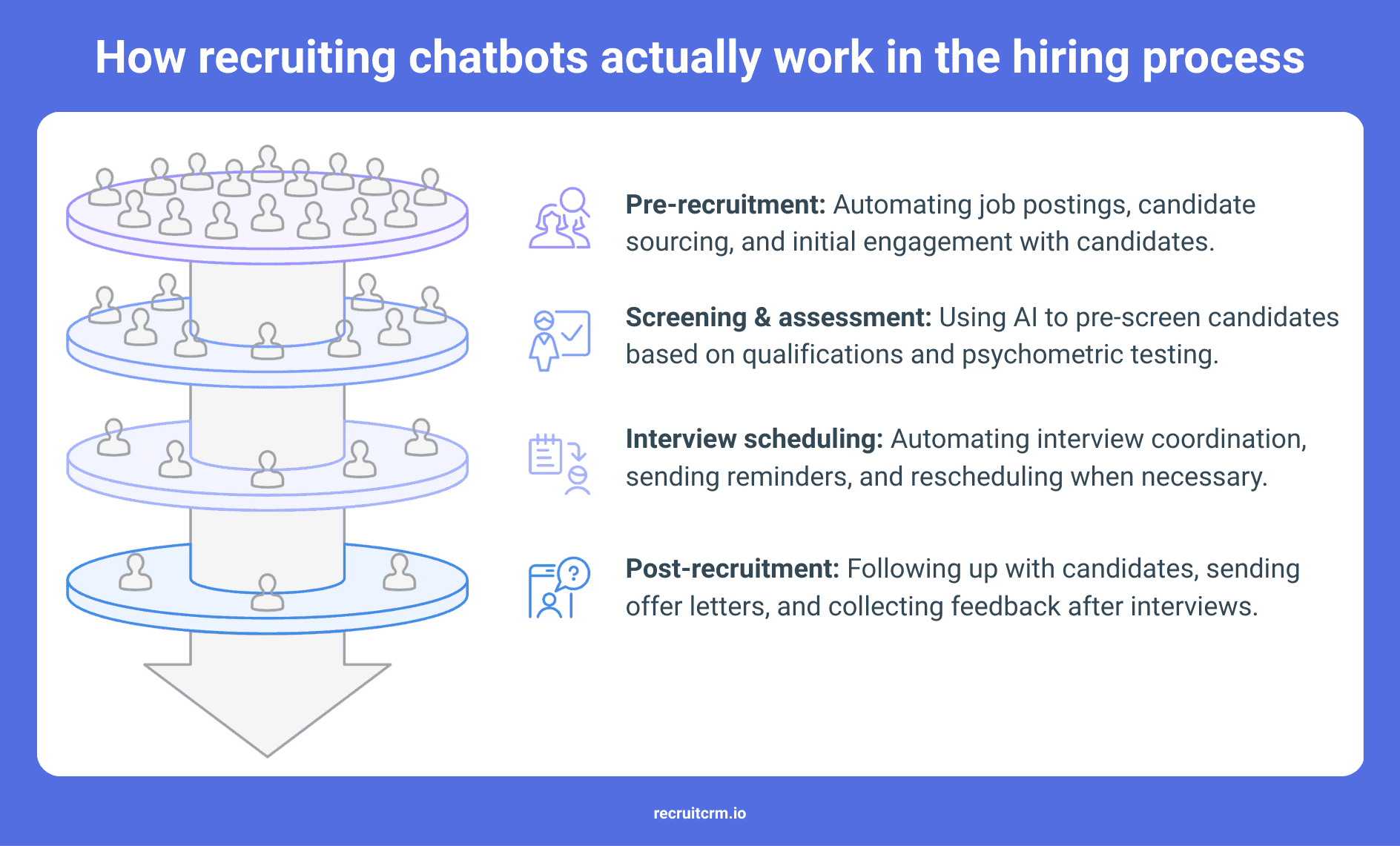
5 key use cases of AI-powered recruiting chatbots
1. Automate candidate screening
Chatbots can quickly analyze resumes and candidate responses, comparing them against job requirements.This allows you to identify the most qualified candidates early on, saving time on manual screenings.
By focusing on relevant skills, experience, and keywords, they ensure only the best-suited candidates move forward, making the screening phase much more efficient.
2. Increase candidate engagement
Engagement is essential, and chatbots excel at maintaining it by offering real-time, personalized responses to candidate queries.Whether applicants are asking about job roles, company culture, or next steps, chatbots provide immediate, relevant answers.
This not only keeps them engaged but also creates a positive first impression, enhancing their experience and encouraging continued interaction.
3. Handle interview scheduling
Scheduling interviews can be a time-consuming task with plenty of potential for mistakes.Chatbots automate the process by checking interviewers' availability, sending out invitations, and issuing reminders to candidates.
They also handle follow-ups, which minimizes the back-and-forth and ensures the scheduling process runs smoothly with little administrative effort on your part.
4. Assist with candidate sourcing
Chatbots help expand your talent pool by proactively engaging passive candidates, those who aren't actively applying for jobs.They initiate conversations, gather key data, and build relationships over time, tapping into a wider pool of potential talent.
This approach enables you to connect with individuals who might not be looking for a new role right now but could be open to future opportunities.
5. Manage crisis & handle negative interactions
In case of issues or frustrations, chatbots can address candidate complaints or misunderstandings in real-time.If a candidate is confused or upset, the chatbot can provide immediate clarification, offer solutions, and ensure the interaction stays on track.
Whether the concern is about job requirements or the application experience, chatbots can resolve issues quickly, maintaining a positive candidate experience even during disruptions.
6 easy steps to get your recruiting chatbot up and running
1. Define your recruitment goals
Begin by identifying the key objectives you want to achieve with your chatbot.Whether it’s speeding up candidate screening, improving engagement, or enhancing the quality of hires, understanding your pain points will guide your decision-making.
Be specific about what success looks like for you so you can tailor your chatbot’s functionalities accordingly.
For example, if you're struggling with high-volume hiring, look for a bot that handles bulk screening effectively.
If engagement is your concern, choose a solution with advanced conversational features.
2. Select the right chatbot solution
Choose a chatbot that aligns with your hiring needs and technology stack.Consider features like AI-driven candidate interactions, seamless ATS integration, scalability for growth, and multilingual support if you're hiring across regions.
Look for a solution that’s flexible enough to adapt to your existing processes and platforms.
Ensure the chatbot is capable of handling different stages of recruitment, from initial screening to interview scheduling, so you’re not limited by its capabilities down the line.
3. Customize your chatbot
Tailor the chatbot to reflect your company’s voice and culture.This includes designing conversational scripts and determining the tone of communication.
Whether you want the chatbot to sound friendly and casual or formal and professional, make sure it aligns with your employer brand.
Set up personalized responses for common candidate questions, ensuring the bot can guide candidates through the process naturally.
You can also set specific triggers for responses based on user behavior, ensuring the interaction feels smooth and relevant.
4. Integrate with your systems
To ensure seamless functionality, integrate your chatbot with your Applicant Tracking System (ATS), HR software, and any other recruitment platforms you use.This allows the bot to access and update candidate information in real time, avoiding manual data entry and ensuring everything stays synchronized.
By setting up this integration, you eliminate the need for multiple systems, which saves time and reduces the risk of errors.
The smoother the integration, the better the chatbot’s effectiveness in supporting your recruitment workflows.
5. Test & train your chatbot
Before going live, conduct thorough testing to refine your chatbot’s responses and capabilities.Simulate different candidate interactions to ensure it handles queries, scheduling, and screening effectively.
Based on these tests, fine-tune the chatbot’s language, logic, and decision-making processes. Make sure it can handle diverse scenarios and provide accurate, helpful responses.
Regularly train the bot with new data and scenarios to keep it aligned with evolving hiring needs.
6. Monitor and optimize
Once your chatbot is live, continuously monitor its performance to ensure it meets your recruitment goals.Track key metrics like response time, candidate engagement rates, and conversion to next steps.
Gather feedback from candidates to identify areas where the chatbot can be improved.
Use this data to make iterative changes to enhance its effectiveness, whether it’s tweaking the conversational flow, improving AI learning, or expanding its capabilities to handle new tasks.
Optimization should be an ongoing process to ensure the chatbot continues to add value over time.
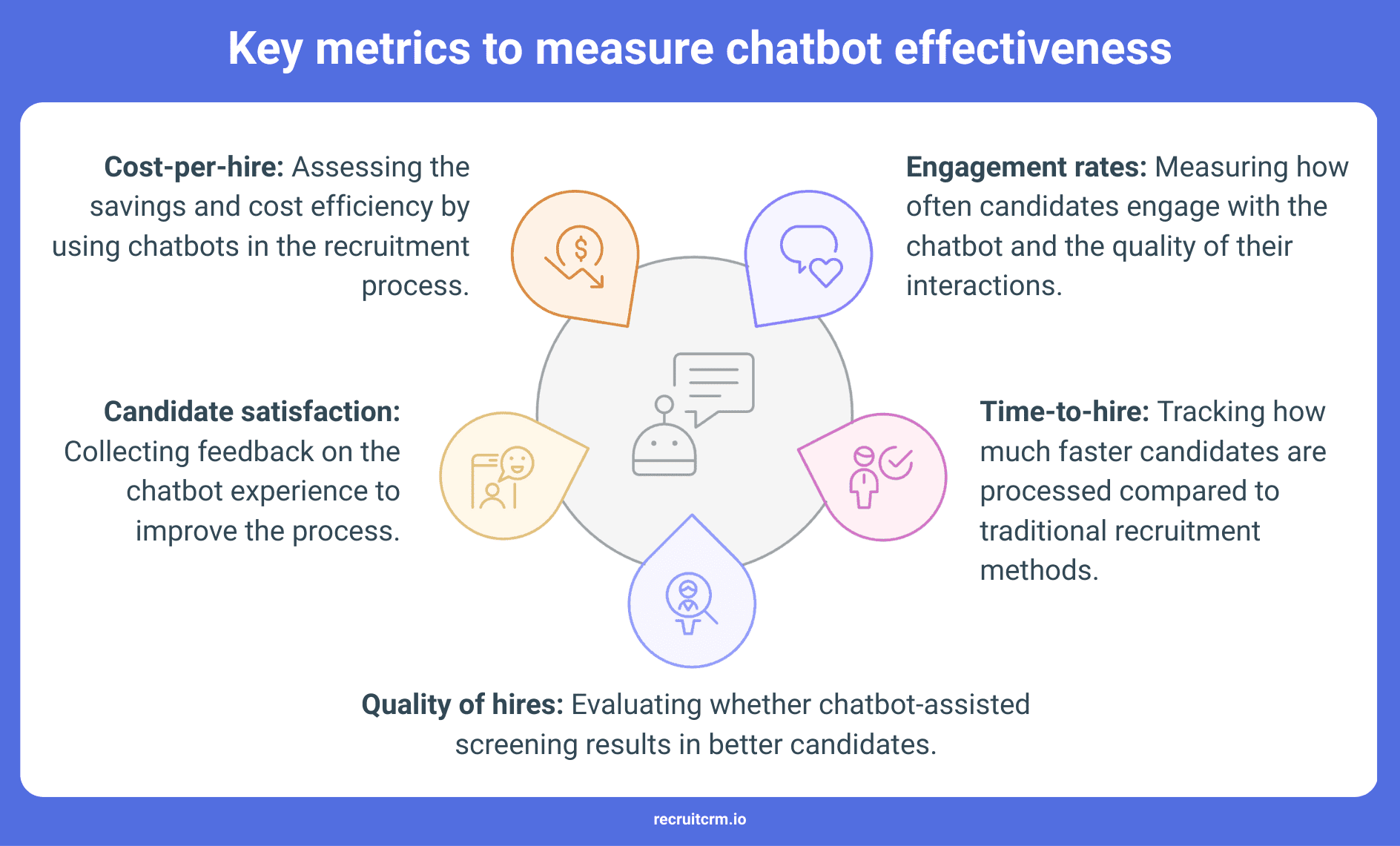
How to tackle recruitment issues with AI chatbots
1. Low interaction rates from candidates
If your chatbot opens conversations but fails to sustain them, the issue likely stems from poor engagement design.Candidates ignore messages that feel impersonal or overly scripted. They also tend to drop off if the chatbot throws too much at them too quickly.
To improve interaction, keep the opening messages short, context-specific, and relevant to the job they’ve shown interest in.
Make sure the questions unfold gradually instead of hitting candidates with a long form disguised as a chat.
Also, consider channel behavior. SMS might work better than email in some industries, while messaging platforms like WhatsApp could be more effective in others.
2. Conversations lack adaptability across different roles
A platform built for a sales position won’t automatically suit a tech hiring flow. Yet many teams try to apply one chatbot script across every vacancy, assuming it will work universally.This often results in poor-quality responses or irrelevant answers.
To solve this, design workflows that mirror how you'd approach a real conversation for each type of role.
Technical positions might require scenario-based follow-ups, while frontline jobs may need rapid-fire availability checks.
Choose a platform that allows conditional branching and lets you fine-tune each stage based on the job type, seniority level, or region.
3. Technical hiccups and workflow friction
When your chatbot isn’t syncing candidate information with your ATS, skipping calendar updates, or failing to notify the right team member, that’s not a small inconvenience but a hazard in your hiring infrastructure. These errors can cause double entries, missed interviews, or even candidate ghosting.Before going live, test every system connection under real conditions.
Don't rely on demo data or vendor assurances alone. Build test cases for each integration and ensure your recruiter dashboard reflects the live status at each step.
Prioritize platforms that offer open APIs, regular updates, and responsive customer support(opens in a new tab).
4. Automated decisions without context
There’s a difference between filtering based on defined criteria and rejecting candidates because a bot didn’t understand a response.Over-reliance on automation without oversight creates blind spots.
High-potential applicants may be disqualified too early, while others are wrongly advanced.
One way to address this is by building checkpoints where you can intervene manually. Flag uncertain responses, vague inputs, or gaps in work history that need human interpretation.
5. Lack of visibility into performance metrics
You may notice fewer conversions or slower movement through the pipeline, but you won’t know where things are breaking unless the chatbot offers clear, granular data.Vague dashboards that track only starts and completions won’t help you optimize.
Look for tools that break down the journey step by step. Identify drop-off moments, unanswered prompts, skipped questions, and delays in follow-ups.
These insights let you improve not just the chatbot, but your entire top-of-funnel process.
Pair this data with recruiter feedback to make practical adjustments.
6. Skepticism and hesitation from applicants
Some candidates prefer human interaction. Others simply don’t trust virtual systems to understand their profile or represent them accurately.This is especially true in mid-to-senior level hiring, or industries where face-to-face interaction still carries weight.
To reduce resistance, clarify what the chatbot is there to do. Don’t try to mask it as a person.
Instead, introduce it as a helpful assistant designed to streamline the process and collect essential information.
Assure candidates that their responses are reviewed by real people, and keep the transition between automation and recruiter touchpoints smooth and timely.
Top 5 recruitment chatbots in 2025
1. Olivia by Paradox(opens in a new tab)
If you're hiring for multiple roles across different functions or locations simultaneously, Olivia might be the chatbot you are looking for.It can screen candidates based on your job requirements, schedule interviews instantly, send reminders, and even follow up with no-shows on its own.
It syncs easily with your ATS, and the entire experience feels seamless from both your side and the applicant’s.
Whether you're hiring for hourly roles or high-volume corporate positions, Olivia takes care of the operational stuff so you can focus on decision-making.
2. Mya by Mya Systems(opens in a new tab)
Mya takes candidate conversations a step beyond basic screening.It uses contextual logic to tailor each interaction, adjusting questions in real time based on how the candidate responds.
The platform collects critical data early on, such as work eligibility, shift preferences, and role-specific qualifications, without overwhelming the applicant.
It also tracks interaction patterns. Meaning how quickly applicants respond, where they drop off, and how engaged they are throughout the exchange.
It flags inconsistencies, identifies missing details, and filters out unqualified profiles before they reach your inbox.
3. XOR AI Recruiter(opens in a new tab)
If you want to move fast and need to reach candidates across multiple channels like SMS, WhatsApp, or email, XOR is the clear choice.This platform can handle everything from the first outreach to screening and scheduling interviews.
It also enables you to manage all interactions in one place without switching between different platforms.
The tool is ideal when you’re hiring across different regions or running multilingual campaigns. XOR automatically adjusts based on language and location.
You can also pull real-time engagement and conversion metrics, which makes reporting easier and faster.
4. HireVue AI Chat(opens in a new tab)
Structuring the early stages of hiring gets really easy with HireVue.It filters candidates using role-specific questions and integrates tightly with HireVue’s video interview platform.
When a candidate passes the chatbot screening, they can immediately move into a video assessment, saving your time and energy.
You can tweak the screening criteria or let the system optimize based on hiring data.
This is especially useful when you're hiring at scale and need to maintain quality while reducing manual screening hours.
5. Humanly.io(opens in a new tab)
Humanly is designed to collect data like experience, intent, and availability while keeping the interaction natural.Candidates don’t feel like they’re filling out a form, but you still get structured insights. That’s helpful when you’re coordinating with hiring managers who want quick summaries and clear context.
It integrates with your ATS and workplace tools like Slack or Microsoft Teams.
You’ll also get visibility into where candidates drop off, what questions slow them down, and how they respond across job types.
Frequently asked questions
1. Can recruiting chatbots help with internal promotions and transfers?
Yes, chatbots can assist with internal promotions and transfers by automatically identifying employees who meet the qualifications for open roles.They help streamline the process by matching skills and experience to available positions, making internal mobility more efficient and transparent.
2. How do recruiting chatbots adapt to changing job requirements and company policies?
Recruiting chatbots can be easily updated with new job requirements and company policies through their admin interface.These updates ensure that the chatbot uses the most current criteria for screening candidates, maintaining alignment with evolving business needs and policies.
3. How do chatbots contribute to unbiased hiring processes?
Chatbots help reduce bias by evaluating candidates based on predefined, objective criteria such as skills, qualifications, and experience, rather than subjective factors like personal appearance or background.This ensures a fair and consistent hiring process.
4. What’s the ROI of using a chatbot with an ATS in your recruitment process?
The ROI of using a chatbot with an ATS comes from automation of time-consuming tasks like candidate screening and scheduling, which speeds up the hiring process.Reducing manual effort, improving candidate engagement, and providing data-driven insights leads to faster, cost-effective hiring and improved hiring quality.
Blog summary
- AI-powered recruiting chatbots play a key role in enhancing the hiring process.
- Chatbots automate key recruitment tasks such as candidate screening, engagement, answering queries, and interview scheduling.
- There are two types of chatbots: rule-based (for simple tasks) and AI-powered (adaptive, learning over time).
- Key features of recruiting chatbots include:
- Natural Language Processing (NLP) to understand diverse candidate queries.
- Machine learning to refine responses based on interactions.
- Integration with HR tools like ATS for a seamless workflow.
- 24/7 availability for continuous candidate engagement.
- Top 5 recruiting chatbots for 2025: Olivia by Paradox, Mya by Mya Systems, XOR AI Recruiter, HireVue AI Chat, and Humanly.io.
- Steps for chatbot implementation: define recruitment goals, select the appropriate chatbot, integrate with HR systems, and optimize regularly.
- The blog aims to assist recruiters in automating recruitment tasks, boosting candidate engagement, and improving overall hiring efficiency.


Get 20% commission on cash collected per month from every customer you refer for upto one year.
Join Recruit CRM’s affiliate program and start making money.
Blog written by
Kanan Parmar
Content Manager at Recruit CRM
Kanan Parmar is a content manager at Recruit CRM, specializing in delivering research-driven content that empowers recruiters. Her work focuses on providing valuable insights and strategies that help recruitment professionals optimize their workflows, make informed decisions, and stay ahead in the recruitment industry.
Categories
Stay ahead with the smartest
recruitment newsletter out there!
Join 30K+ recruiters reading the best newsletter in recruitment.