Timesheet approval software: Guide for staffing agencies


For staffing agencies, managing timesheets for multiple clients can be challenging. Each client may have different approval deadlines, designated approvers, working schedules, and requirements for reviewing contractor hours.
As the number of clients and contractors grows, keeping track of all these requirements becomes increasingly difficult. Timesheets can remain pending for days, operations teams spend hours chasing client managers, and billing can be delayed because approved hours are not available when needed.
The challenge is not simply getting timesheets approved. It is ensuring that the right person reviews the right timesheet at the right time, regardless of how many clients or contractors the agency manages.
A well-defined approval process, supported by the right tools, can help staffing agencies reduce delays, improve visibility, and spend less time on manual follow-ups.
7 ways to improve timesheet approvals across multiple clients
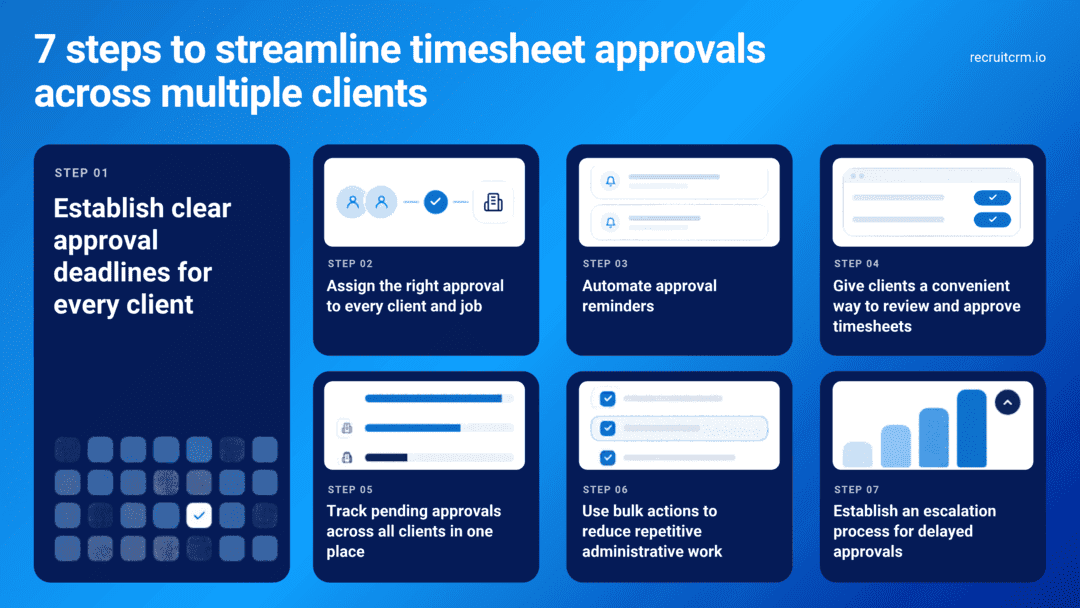
1. Establish clear approval deadlines for every client
One of the biggest challenges in managing multiple clients is that they rarely follow identical hiring processes.One client may expect timesheets to be approved every Monday, while another may have a different weekly cutoff. Some clients may require approval from a direct manager, while others may require additional review.
Trying to manage these differences from memory or through scattered email conversations can lead to missed deadlines.
Start by documenting the approval requirements for each client.
For example, maintain a record of:
- Timesheet submission deadlines.
- Client-specific approval deadlines.
- The designated approver for each job or contractor.
- The frequency of timesheet processing.
- Any additional requirements before a timesheet can be approved.
2. Assign the right approver to every client and job
A timesheet can be submitted on time and still remain pending simply because it has reached the wrong person.This can happen when a client manager changes roles, a contractor moves to another assignment, or an agency fails to update its records after a client changes its timesheets approval process.
In contract staffing agencies working with multiple clients, these seemingly small issues can create significant delays.
To prevent them, maintain an accurate record of who is responsible for approving timesheets for each client, job, or contractor.
Consider the following practices:
- Assign designated approvers for the relevant client jobs.
- Confirm approval responsibilities when a new contractor starts an assignment.
- Update approver details when responsibilities change.
- Establish a backup contact or escalation path for situations where the primary approver is unavailable.
- Periodically review the approver list to ensure it remains accurate.
This is particularly important when several managers within the same client organization have access to contractor information, but only certain individuals are authorized to approve hours.
3. Automate approval reminders
Manual follow-ups are manageable when you have a small number of outstanding timesheets. They become much harder to sustain when dozens of client contacts need to approve timesheets across different deadlines.Your operations team may need to identify pending submissions, find the appropriate approver, compose a reminder, and repeat the process if there is no response.
This is repetitive work that can often be reduced through workflow automation.
Look for timesheet software that sends email reminders when submitted timesheets are awaiting approval.
Ideally, reminders should:
- Notify approvers when timesheets require their attention.
- Make it easy to access the relevant timesheets.
- Bring multiple pending timesheets to the same approver’s attention where supported.
- Allow your team to send additional reminders when a specific follow-up is needed.
However, reminders alone will not solve every problem. If an approver is unavailable or responsibilities are unclear, your team still needs a process for resolving the issue.
4. Give clients a convenient way to review and approve timesheets
Client managers are often balancing several responsibilities. If reviewing timesheets requires searching through email attachments, checking spreadsheets, or navigating multiple systems, approvals can easily become a low priority.Make the process as straightforward as possible.
A dedicated client portal can give authorized client contacts a central place to review contractor timesheets and approve submissions.
Depending on the system and permissions configured, clients may be able to:
- View timesheets associated with their jobs.
- Review recorded working hours and overtime hours.
- Approve or reject submitted timesheets.
- Provide feedback when corrections are required.
- Track the status of timesheets awaiting their action.
For staffing agencies, this creates a more structured way to collaborate with clients. Contractors submit their hours on the contractor portal, designated client contacts review them, and the agency can monitor progress within its timesheet system.
Before introducing a portal, explain the process to your clients and ensure that the appropriate contacts have access and understand their responsibilities.
5. Track pending approvals across all clients in one place
When an agency works with multiple clients, the operations team needs more than a list of submitted timesheets. It needs visibility into what is awaiting approval and where delays are occurring.Without a central view, team members may have to check individual records, email threads, or spreadsheets to determine which timesheets are still pending, making it difficult to prioritize work and identify recurring bottlenecks.
Ideally, the system should make it easy to identify:
- Timesheets awaiting client approval.
- Timesheets awaiting internal agency approval.
- Rejected timesheets that require correction.
- Timesheets that have already been approved.
- Outstanding items associated with particular clients or approvers.
For example, if most clients have completed their approvals but one client has several outstanding submissions, the operations team can concentrate on that account.
Similarly, if one approver consistently delays submissions, the account manager can investigate the root cause.
6. Use bulk actions to reduce repetitive administrative work
Managing timesheets individually can be time-consuming, particularly when an agency has many contractors working across multiple clients.In situations where the operations team needs to update time entries, submit completed timesheets, or approve multiple eligible submissions, opening each record individually adds unnecessary steps. Bulk actions can make these routine tasks more efficient.
Depending on the software and applicable permissions, bulk functionality may allow users to:
- Update time entries across multiple timesheets.
- Submit multiple completed timesheets in one action.
- Approve multiple submitted timesheets where the user is an authorized approver.
- Send reminders for several outstanding timesheets.
- Process other supported actions without opening every record individually.
Instead of manually entering each contractor’s hours, agencies can use bulk entry to process multiple records more efficiently, reducing repetitive work and the risk of data entry errors.
However, bulk processing should respect client-specific requirements and approval permissions. Timesheets should only be approved after the appropriate review, and users should understand which records are included in each action.
7. Establish an escalation process for delayed approvals
Even with clear deadlines, automated reminders, and convenient approval tools, some timesheets will remain pending.An approver may be on leave, a client contact may have changed roles, or a timesheet may require clarification before it can be approved.
Without a defined escalation process, these cases can remain unresolved until someone notices that billing is delayed.
Establish a consistent procedure for handling overdue approvals.
For example:
- First step: Send an automated reminder when a submitted timesheet is awaiting approval.
- Second step: If the timesheet remains pending beyond the agreed deadline, contact the designated approver directly.
- Third step: If the approver is unavailable, contact the agreed backup or escalation contact.
- Fourth step: If the delay continues, involve the relevant account manager to resolve the issue with the client.
It is also useful to record recurring delays. If the same client regularly misses approval deadlines, discuss the issue with the account manager and agree on a more workable process.
If a timesheet is rejected due to missing or incorrect information, ensure the contractor receives clear feedback and knows what needs to be corrected.
So, just to summarize this for a quick glance, here is what you need to know:
| Step | What this involves |
| 1. Set clear deadlines | Document each client's submission and approval schedules to avoid missed deadlines. |
| 2. Assign approvers | Ensure every timesheet has a designated approver and, when needed, a backup contact. |
| 3. Automate reminders | Send automated notifications and follow-ups to keep pending approvals moving. |
| 4. Simplify client approvals | Use a client portal to make it easier to review, approve, and reject timesheets. |
| 5. Track pending approvals | Monitor approval statuses across clients in one place to identify and resolve delays. |
| 6. Use bulk actions | Process multiple timesheets and reminders together to reduce manual work. |
| 7. Escalate delays | Set up a clear process for handling overdue approvals and unresolved issues. |
How Recruit CRM timesheets can help streamline approvals
The practices outlined above become easier to manage when your timesheet system integrates contractor submissions, client approvals, reminders, and timesheet tracking into a single workflow.Recruit CRM Timesheets integrates with the Recruit CRM platform and supports contract staffing workflows, helping agencies manage timesheets alongside their recruitment and contractor records.
Relevant capabilities include:
- Client portal: Give authorized client contacts access to timesheets for their jobs, with permissions that control which actions they can perform.
- Approver notifications: Notify designated approvers when submitted timesheets are awaiting their review.
- Automated email reminders: Configure automated reminders to contractors and approvers, reducing the need for agency teams to manually chase outstanding submissions and pending approvals.
- Automated approval escalations: Set up automated escalations when a timesheet remains unapproved beyond a specified date. This helps bring overdue approvals to the attention of the appropriate people and ensures that delays do not go unnoticed.
- Custom email reminders: Allow agency users to send targeted reminders to specific contractors or approvers when follow-up is needed.
- Centralized timesheet management: View and manage timesheets across contractors and jobs from a central page.
- Bulk actions: Perform supported actions, including updating time entries, sending reminders, and approving eligible timesheets in batches.
- Activity history: Review recorded timesheet activity, including who submitted, edited, or approved a timesheet and when.
For example, an agency managing contractors for several clients can use centralized timesheet management to identify outstanding approvals, send reminders to the relevant approvers, and use bulk actions where appropriate.
Rather than spending time checking every record individually, the operations team can concentrate on pending items and investigate delays that require human intervention.
Conclusion: Build a repeatable timesheet approval process
Streamlining timesheet approvals across multiple clients requires more than sending reminders. It requires clear deadlines, accurate approver assignments, convenient review workflows, centralized visibility, and a consistent process for handling delays.Start by documenting each client’s requirements and ensuring every timesheet has a designated approver. Use automated reminders to reduce manual follow-ups, provide clients with a straightforward way to review submissions, and centrally track outstanding approvals.
As your contractor workforce and client base grow, these practices become increasingly important. A process that works for a few clients may become difficult to manage when hundreds of contractors are spread across different jobs, approval schedules, and locations.
The right process, supported by suitable timesheet software, can help reduce administrative effort, improve approval turnaround times, and make downstream billing workflows more predictable.
Looking to simplify timesheet approvals across your clients? Explore Recruit CRM Timesheets to see how client portals, approver reminders, bulk actions, and centralized timesheet management can support your contract staffing workflow. Book a demo now!
Frequently Asked Questions
1. How can staffing agencies manage timesheet approvals across multiple clients?
Staffing agencies can streamline approvals by documenting each client’s deadlines, assigning designated approvers, automating reminders, and tracking pending timesheets in one place. Timesheet software with client portals and centralized management can help reduce manual follow-ups and make it easier to identify delays.2. How can I remind multiple clients to approve timesheets without sending individual emails?
Look for timesheet software that supports automated approver reminders and consolidated email notifications. For example, when multiple pending timesheets belong to the same recipient, Recruit CRM can send a single consolidated reminder covering the relevant timesheets. Agency users can also send custom reminders when additional follow-up is required.3. What should I look for in timesheet approval software for a staffing agency?
Look for software that supports designated approvers, client portals, automated email reminders, and escalations for timesheets that remain unapproved beyond specified deadlines.It should also offer custom reminders, centralized timesheet tracking, and bulk actions to reduce repetitive administrative work. An activity history that records who submitted, edited, or approved a timesheet and when is equally important for accountability.
If your agency manages multiple clients, ensure the software can accommodate different approval requirements and provide clear visibility into outstanding timesheets.




Blog written by
Lathiba R
Senior associate content writer at Recruit CRM
Lathiba is a Senior Associate Content Writer at Recruit CRM who creates engaging, insight-driven content for recruiters. She specializes in addressing real recruiter pain points and turning them into practical, easy-to-apply solutions that help improve hiring outcomes. Alongside research-backed content, she crafts witty, relatable social media pieces that bring a fresh, human perspective to recruitment.