The bulk timesheet entry hack that saves hours every week


Entering working hours for 5-10 contractors individually may seem manageable. But what happens when you have 50, 100, or even 500 contractors working across multiple clients and locations?
The problem becomes even more complicated when clients send timesheet information in different formats. Some share Excel spreadsheets, others send PDFs or email attachments, while some still submit scanned documents or photographs of handwritten time cards.
Your operations team then has to collect this information, identify the relevant contractors, transfer the hours into your timesheet system, and check every entry for accuracy.
This is a lot of repetitive administrative work, and it takes time away from more important activities. So, how can staffing agencies process large volumes of timesheets without spending hours on manual data entry?
Let’s explore some practical ways to make the process faster, more accurate, and easier to manage.
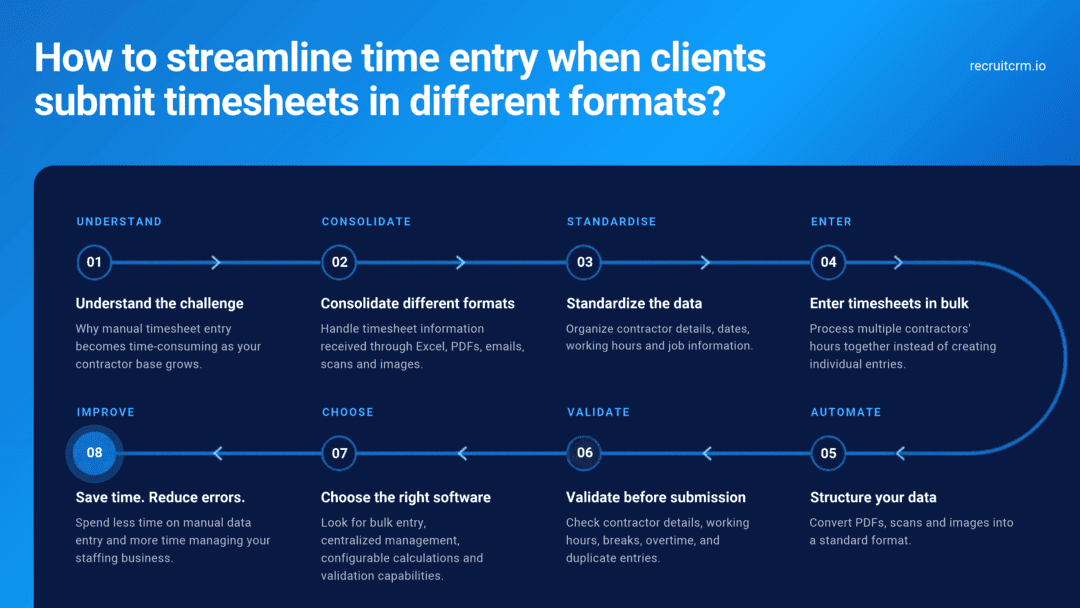
1. Understand why manual timesheet entry becomes a problem
Manual timesheet entry may work when you manage a small number of contractors. However, it becomes increasingly inefficient as your contractor population grows.Every week, the operations team needs to collect working hours, identify the correct contractor and job, enter the hours into the system, and verify the accuracy of the information.
Even if entering one contractor’s timesheet takes just a few minutes, the cumulative effort can be substantial.
There are several reasons why manual entry becomes a bottleneck:
- Repetitive data entry: Employees have to create timesheets and enter hours individually for multiple contractors.
- Different submission formats: Clients may send timesheet information through spreadsheets, PDFs, email messages, scanned documents or photographs of paper timesheets.
- Risk of human error: Incorrect dates, hours, contractor details, or job assignments can lead to inaccurate billing and payments.
- Time spent checking entries: Operations teams need to verify that the information entered matches what the client originally submitted.
- Delayed processing: When timesheet entry takes longer, approvals, invoicing, and contractor payments can also get delayed.
2. Deal with timesheet information arriving in different formats
One of the biggest challenges for staffing agencies is that there isn’t always a standard format for receiving timesheet information.Depending on the client, your team may receive:
- Excel or CSV files containing working hours for multiple contractors.
- PDFs generated from a client’s internal time-tracking system.
- Timesheet details pasted directly into an email.
- Scanned copies of completed paper timesheets.
- Photographs of handwritten time cards sent by contractors or client supervisors.
What can you do?
Start by standardizing how clients submit timesheet information wherever possible.Encourage clients to include essential information such as:
- Contractor name or unique identifier.
- Client and job details.
- Timesheet period.
- Working dates.
- Start and end times or total hours worked.
- Break durations.
- Overtime hours, where applicable.
- Client supervisor or approver details.
- Allowances if applicable
- Expenses to be claimed
This is where bulk-entry capabilities and document-processing technologies can make a difference.
3. Use bulk timesheet entry instead of creating records individually
If your operations team manages dozens or hundreds of contractors, entering timesheets one at a time is rarely the most efficient approach.Bulk timesheet entry lets you enter working hours for multiple contractors at once, rather than creating each timesheet separately.
Instead of opening each contractor’s record, creating a timesheet, and entering the hours individually, your team can use a bulk-entry interface to process multiple contractors together.
Depending on the software, bulk-entry capabilities may allow you to:
- Select multiple contractors and enter their working hours.
- Add time entries for several contractors in one workflow.
- Update multiple time entries together.
- Reduce repetitive navigation between contractor and job records.
- Review the entries before submitting them for approval.
4. Turn PDFs, scanned documents, and images into structured data
Bulk timesheet entry works fastest when every contractor’s hours are already in a structured format, such as a spreadsheet with 1 row per contractor per working day.Timesheets that arrive as PDFs, scanned documents, or photographs of handwritten time cards need an extra step before your operations team can enter them in bulk.
Optical character recognition (OCR) tools and AI document-processing tools can help with this step. OCR tools recognize text in scanned documents and images. Document-processing tools can pull out details such as contractor names, dates, and working hours and organize them into a table.
For example, a document-processing tool reading a photograph of a handwritten timesheet could:
- Read the contractor’s name.
- Identify the working dates and the hours worked on each date.
- Extract start times, end times, and breaks.
- Organize the timesheet details into rows and columns.
- Flag fields that are missing or hard to read.
Agencies without a document-processing tool can get a similar result with a standard spreadsheet template. Your team copies hours from PDFs and scans into 1 shared template, and the bulk entry step stays the same for every client.
Extracted timesheet data still requires human review before submission because handwriting, poor image quality, and inconsistent layouts can affect accuracy. This review matters most when the hours feed directly into client invoices and contractor payments.
5. Introduce validation checks to reduce errors
Entering timesheets in bulk can save considerable time, but speed should not come at the expense of accuracy.A single incorrect entry can affect client invoices, contractor payments, and profitability. So before submitting timesheets for approval, you should introduce checks to identify common mistakes.
Some important validations include:
| Contractor mapping | Is the timesheet assigned to the correct contractor? |
| Job mapping | Is the contractor associated with the correct client and job? |
| Date validation | Does the timesheet fall within the contractor’s assignment period? |
| Duplicate entries | Has a timesheet already been created for the same contractor, job, and period? |
| Working hours | Are the total hours within a reasonable range? |
| Breaks | Have applicable break rules been considered? |
| Overtime | Are overtime hours calculated according to the relevant rules? |
| Missing information | Are any dates or required entries missing? |
6. Choose timesheet software that supports bulk processing
If timesheet processing is a recurring challenge, spreadsheets and manual workflows may no longer be sufficient.When evaluating timesheet software, look beyond the ability to record working hours. Consider whether the software can help your team manage the entire timesheet process efficiently.
Here are some capabilities worth evaluating:
a. Bulk time entry: Can you enter working hours for multiple contractors together instead of creating individual timesheets?b. Bulk updates: Can you update multiple time entries without opening each timesheet separately?c. Contractor and job mapping: Can the system associate each timesheet with the correct contractor, client, and job?d. Configurable bill-and-pay calculations: Can you configure different overtime rules, multipliers, breaks, and rates for different clients or jobs?e. Validation and activity history: Can you identify incorrect entries and review who created, edited, or approved a timesheet?f. Centralized timesheet management: Can your operations team view and manage timesheets across contractors and jobs from one place?j. Approval workflows: Can timesheets be sent to designated client approvers once they have been entered?h. Document-processing capabilities: Does the software support importing or extracting timesheet information from spreadsheets, PDFs, scanned documents or images?
Not every staffing agency will need all these capabilities immediately. However, choosing software that can support increasing volumes and more complex workflows can help avoid operational bottlenecks as your business grows.
How Recruit CRM helps staffing agencies manage timesheets in bulk
For staffing agencies already using an Applicant Tracking System (ATS), managing contractor information and timesheets in separate systems can create additional administrative work.Recruit CRM brings timesheet management into its recruitment platform, allowing staffing teams to manage contractor and job information alongside their timesheet workflows.
Its bulk time-entry functionality helps users add working hours for multiple contractors without creating each time entry individually.
Recruit CRM Timesheets also offers capabilities such as:
- Bulk time entry: Add working hours for multiple contractors through a consolidated workflow.
- Centralized timesheet management: View and manage timesheets across contractors and jobs from the Timesheets tab.
- Configurable bill-and-pay calculations: Apply different calculation rules, overtime multipliers, and break settings based on client and job requirements.
- Client and contractor portals: Provide designated users with access to relevant timesheet workflows.
- Automated email reminders: Reduce the effort involved in following up with contractors and approvers.
- Activity history: Track important timesheet activities, including submissions, edits, and approvals.
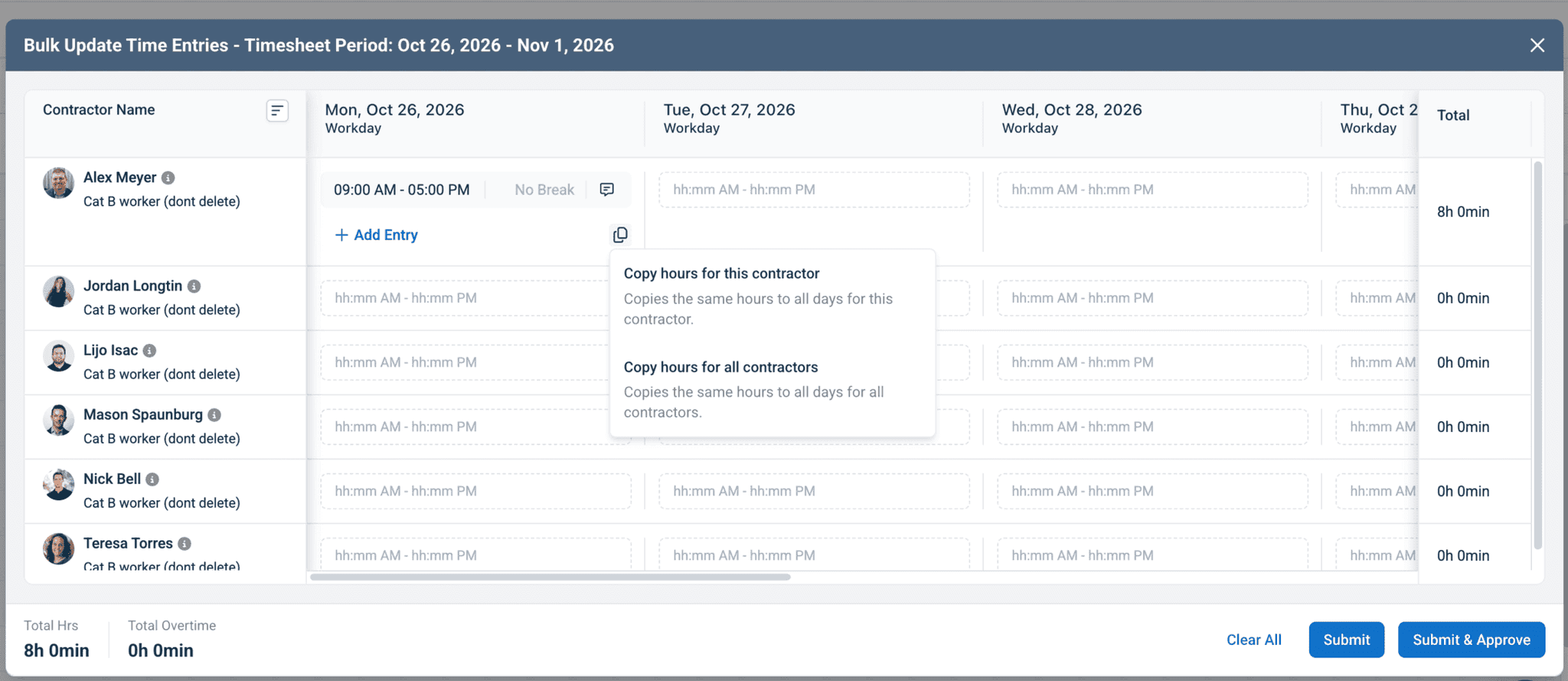
By bringing recruitment and timesheet management together, Recruit CRM helps staffing agencies reduce administrative effort and manage their contract staffing operations on a single platform.
To learn more, visit the Recruit CRM Timesheets product page.
Conclusion: Spend less time entering data, more time managing your business
Manual timesheet entry may seem manageable when you have only a handful of contractors. But as your staffing business grows, processing hours individually can consume a significant amount of your operations team’s time.The challenge becomes even greater when clients send timesheet information in different formats, such as spreadsheets, PDFs, email attachments, scanned documents, or photographs of handwritten time cards. Someone has to consolidate the information, enter it into the system and check that everything is accurate.
The solution is not simply to enter data faster. It is to reduce repetitive work, standardize the information you receive, use bulk-entry capabilities, and introduce checks that help identify errors before timesheets are submitted for approval.
When evaluating timesheet software, look beyond basic time tracking. Consider whether it allows you to manage multiple contractors together, enter hours in bulk, apply the correct bill-and-pay calculations, and keep all timesheet records organized in one place.
Ultimately, your operations team should spend less time converting information between formats and more time managing exceptions, resolving discrepancies, and keeping your contract staffing business running smoothly.
Frequently asked questions
1. What is bulk timesheet entry?
Bulk timesheet entry is the process of entering or updating working hours for multiple contractors or employees together, rather than creating each timesheet individually. It helps staffing agencies reduce repetitive administrative work, particularly when managing large contractor populations or processing timesheets for multiple clients.2. How can I enter timesheet data received through PDFs, emails or scanned documents?
The first step is to consolidate the information into a structured format containing contractor details, dates, working hours, and relevant job information. Depending on the available software, this information can be entered via bulk-entry tools or imported from supported file formats. OCR and document-parsing technologies can also help extract information from PDFs, scanned documents and photographs, reducing manual transcription.3. How can I reduce errors when entering timesheets in bulk?
Use standardized timesheet templates wherever possible and ensure every entry is mapped to the correct contractor, client, job and timesheet period. Before submitting records, validate working dates, total hours, breaks, overtime and duplicate entries.Timesheet software with configurable calculations, validation checks and activity history can further help reduce errors and improve accountability.




Blog written by
Chhavi Chugh
Manager, Content at Recruit CRM
Chhavi Chugh is a content strategist at Recruit CRM with expertise in creating research-backed content for recruiters. She develops practical, actionable insights that help recruitment professionals streamline processes, improve outreach, and grow their businesses. Chhavi's work is designed to address the specific challenges recruiters face in today's hiring landscape.